.png)
Description:
The program allows to block undesirable incoming and outgoing calls and SMS. The rights of root are necessary for functioning. There is a support Dual SIM smartphones.
Blocking is carried out at system level, the program doesn't miss the first call, the screen isn't lit and there is no window of a dialer.
Features:
- Blocking incoming SMS on Android 4.4 above without appointment as its program for SMS processing.
- Blocking of outgoing calls and SMS.
- Support the Dual SIM smartphones with opportunity to set various parameters of blocking for everyone SIM.
For calls it is possible to choose a way of blocking "Reject" or "Not to answer". For SMS at desire it is possible to set the filter in the text (if the filter isn't set, all SMS from specified number are blocked). For division of several filters the symbol is used ";" . If at the beginning of a field for the filter to put a symbol "!" all SMS not corresponding to the filter will be blocked.
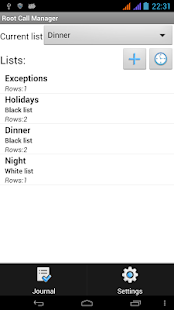
For a filtration of numbers it is necessary to create the list and to make it current.
The "Not to block" mode - all functions of blocking are disconnected.
The black list - is made blocking of all numbers added in this list, for each number it is possible to establish the parameters of blocking.
The white list - is made blocking of all numbers which aren't entering this list, parameters of blocking undertake from list settings.
Exceptions numbers of this list are processed by the set rules irrespective of settings of the current list.
At number addition in the list it is possible to specify a template ("?" means any symbol, "*" means any quantity of any symbols). For blocking of hidden numbers for number it is necessary to leave a field empty. It is possible to use regular expressions (have to start with "^" and end with "$", only in the full version of the program).
There is an opportunity to use schedules - in set time the appointed list will be made the current.
Restrictions of the free version:
- No more than two entry in the list (it is possible to use templates, all from contacts, all not from contacts, numbers containing letters), aren't supported groups of contacts and an exceptions
- There is no scheduler
Important system settings:
- Wait after boot, sec.
This delay is necessary in order that by the time of program start радимодуль the telephone module managed to be activated completely. Typical value – 10 … 40 sec., but many devices work and with a zero delay. If on your Dual Sim there is no blocking on the second this, it is necessary to increase this value.
- Submode
Point serves for control for hardware features of the device. Selection of a submode at which the program is efficient can be demanded and the network on the device after start of the program (reboot) doesn't vanish. After each change of a submode or the Wait after boot the hard reset is necessary (not fast). For smartphones on MTK it is necessary to choose a submode 1.
In settings, point, "About" it is possible to look at current state of service, for successful work of the SIM1(SIM2 for Dual SIM ) has to be green.
- Samsung submode
On different models/insertions of Samsung smartphones different formats of commands of the radio module for indication of entering calls are used. If there is not that mode, number of an entering call will be incorrectly defined. It doesn't influence in any way definition of number of incoming SMS.
Integration with Tasker: for use of Tasker it is necessary to add "To start the application" as a task, to choose Root Call Manager and to enter a list name into the data field. Thus there will be a chosen list will be made the current.
Blocking is carried out at system level, the program doesn't miss the first call, the screen isn't lit and there is no window of a dialer.
Features:
- Blocking incoming SMS on Android 4.4 above without appointment as its program for SMS processing.
- Blocking of outgoing calls and SMS.
- Support the Dual SIM smartphones with opportunity to set various parameters of blocking for everyone SIM.
For calls it is possible to choose a way of blocking "Reject" or "Not to answer". For SMS at desire it is possible to set the filter in the text (if the filter isn't set, all SMS from specified number are blocked). For division of several filters the symbol is used ";" . If at the beginning of a field for the filter to put a symbol "!" all SMS not corresponding to the filter will be blocked.
For a filtration of numbers it is necessary to create the list and to make it current.
The "Not to block" mode - all functions of blocking are disconnected.
The black list - is made blocking of all numbers added in this list, for each number it is possible to establish the parameters of blocking.
The white list - is made blocking of all numbers which aren't entering this list, parameters of blocking undertake from list settings.
Exceptions numbers of this list are processed by the set rules irrespective of settings of the current list.
At number addition in the list it is possible to specify a template ("?" means any symbol, "*" means any quantity of any symbols). For blocking of hidden numbers for number it is necessary to leave a field empty. It is possible to use regular expressions (have to start with "^" and end with "$", only in the full version of the program).
There is an opportunity to use schedules - in set time the appointed list will be made the current.
Restrictions of the free version:
- No more than two entry in the list (it is possible to use templates, all from contacts, all not from contacts, numbers containing letters), aren't supported groups of contacts and an exceptions
- There is no scheduler
Important system settings:
- Wait after boot, sec.
This delay is necessary in order that by the time of program start радимодуль the telephone module managed to be activated completely. Typical value – 10 … 40 sec., but many devices work and with a zero delay. If on your Dual Sim there is no blocking on the second this, it is necessary to increase this value.
- Submode
Point serves for control for hardware features of the device. Selection of a submode at which the program is efficient can be demanded and the network on the device after start of the program (reboot) doesn't vanish. After each change of a submode or the Wait after boot the hard reset is necessary (not fast). For smartphones on MTK it is necessary to choose a submode 1.
In settings, point, "About" it is possible to look at current state of service, for successful work of the SIM1(SIM2 for Dual SIM ) has to be green.
- Samsung submode
On different models/insertions of Samsung smartphones different formats of commands of the radio module for indication of entering calls are used. If there is not that mode, number of an entering call will be incorrectly defined. It doesn't influence in any way definition of number of incoming SMS.
Integration with Tasker: for use of Tasker it is necessary to add "To start the application" as a task, to choose Root Call Manager and to enter a list name into the data field. Thus there will be a chosen list will be made the current.
Requirements: Android 2.2 and up

~ OR ~

.png)
.png)
.png)
.png)