Showing posts with label Personalization. Show all posts

Friday, 19 June 2015

Total Launcher Premium v1.1.5 APK


Description:
======== NOTICE ========
Finally the new ssLauncher comes!
Total launcher is the next generation of ssLauncher and also includes the great features of qLauncher.
DO NOT RESTORE FROM BACKUP OF SSLAUNCHER!
IT'S NOT COMPATIBLE! SORRY.

=======================
Total launcher is the best customizable launcher in Android. Of course, it is still fast, light and easy to use.

Do you like a simple home? Use this.
Do you like a beautiful home? Use this.
Do you like a smart home? Use this.
Is there no home launcher you want? Make it with this.
Whatever you want for home, this is it.

I would like to tell you just one phrase.
"Press and hold it to edit it"
You can customize it, whatever it is.


Requirements: Android 2.2 and up


~ OR ~


Monday, 5 January 2015

Resize Me! Pro v1.54 APK

Image
Description:
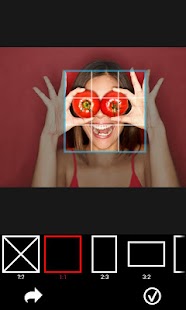
 Resize your photos easily with 'Resize Me!' before sending them by Email or sharing them on Twitter, Facebook,

Image

You can do that with just one click, or use the interface to rotate, crop and resize.
You can try 'Resize Me!' Lite version before to buy the full version.
FOR SUPPORT AND HELP, please contact me at contact@xnview.com.
---- Usage -----
* Launch 'Resize Me!'
Open a photo or take from camera
Rotate, crop, resize
share or save
* Launch from your viewer (e.g. Gallery)
Select or Open an image
Tap on "share" or "send it" and choose 'Resize Me!'
Choose image size
Select the application that you want to use to open the result
* Launch from mail apps
Tap on attach button
Choose 'Resize Me!'
Choose your viewer (e.g. Gallery)
Select an image (or a list of image)
Choose image size
--- Features ---
* Custom size
* Easy to use
* Keep EXIF tags
* Keep GPS data
* Rotate and crop
* Set as Wallpaper
* Share or save the result
--- Only available in full version
* Resize multiple images
* Text watermark

What's New
★ Bugs fixed
You like ResizeMe? Please give us 5 stars! Your feedback is very important to our work.
Help us to improve it by sending your bugs or requests on contact@xnview.com


Requirements: Android 2.2 and up


~ OR ~


Thursday, 14 August 2014

GMD Auto Hide Soft Keys PRO ★ root v2.8-beta2 APK


Description:
AHSK allows to hide navigation bar and auto show/hide it with simple swipe from bottom. It hides only navigation bar (soft keys) in Phone UI and does not hide notification bar.
Requires ROOT!
KitKat support added!
Known issues:
- On Android 4.4 (KitKat) Hiding/showing stock navigation bar will trigger lock screen.
Unique features:
- Hide just navigation bar and keep notifications bar.
- Show Quick NavBar and click soft button with one simple swipe.
- Spoof Soft Keys - make Android think you still have soft keys and display Menu button in applications actions bar.
- Theme Quick NavBar - use any custom image for buttons.
- Adjust trigger size and position.
- Integrate with Gesture Control or Tasker using Shortcuts.
- Stock firmwares, CyanogenMod, Pac Rom and Paranoid Android supported.
- No modifications and no reboot required.
PRO features:
- Change trigger color and/or transparency.
- Disable trigger (and Quick NavBar) if you use other alternative.
JOIN Beta version community - https://plus.google.com/communities/115800359125266491041
AndroidPolice.com review: http://www.androidpolice.com/2013/06/04/new-app-gmd-hide-soft-keys-banishes-the-navigation-bar-for-root-users-nexus-only-for-now
Other full screen apps hide notifications bar too and has no option to hide just navigation bar. Hide Soft Keys is different - it only removes navigation bar and replaces it with Quick NavBar. You can always access stock notifications list and recent applications list.


Requirements: Android 4.0 and up


~ OR ~


Monday, 4 August 2014

SAO Launcher PRO v2.9 (+ Extensions & Themes) APK


Description:
*** Sale sale sale! :] ***
We're celebrating 500,000 downloads! Themes are free and Pro is set to $2.99 and will go up $1 every day until it's back to $5 on August 6th!
************************
The Sword Art Online system menu, for smartphones and tablets. Pay $5 inside Options to turn off ads and unlock additional features. The total cost of Pro and all extensions & themes is around $13.
Drag down from the top left corner of your screen and orbs will fall into place, giving you quick access to various features of your phone. Call and text friends, launch your favorite apps via shortcuts, control music, and more using the various orbs.
SAO is built to be extendable. There are many free and paid themes and extensions available in the Store. Themes update the images, sounds, and fonts used in the app creating a completely different experience. Extensions, on the other hand, are additional orbs that appear when downloading other apps. SMS, for example, is a free extension for phones.
Both themes and extensions have an API for those who want to truly customize the experience. The documentation is still in it's infancy, so don't feel afraid to email us at xlythe@gmail.com for additional help or to submit an app to the Store.
http://xlythe.com/saolauncher/theme.html
http://xlythe.com/saolauncher/extension.html

FAQ:
Q: Can I help translate the app to my language?
A: Sure! We'll give you (and any friends) Pro if you help keep our translations up-to-date. You can now help out with translating using Localize (https://www.localize.im/v/dq). Email us afterwards (xlythe@gmail.com) to work out who to give Pro access to.
Q: Can I help test new features or recommend ideas?
A: Of course! Join our community (https://plus.google.com/communities/106623201559847991380) and, if you're interested in being on the cutting edge, sign up for Testing. We'll do our best to address bugs promptly.
Q: How do I use themes?
A: Install the theme, then go into Options, Themes. You should see it as a choice aside Default.
Q: My extensions aren't working (or... anything isn't working).
A: Try rebooting. If it still doesn't work, feel free to send us an email (xlythe@gmail.com) or report it in the community.
Q: Why can't I uninstall the app?
A: It's probably set as a Device Administrator (a legacy feature from Log Out). Go into Settings, Security, Device Administrators, and uncheck SAO Launcher.
Q: Why is log out missing?
A: Log out required Device Administrator, which made it difficult to uninstall the app.
Q: How do I get sms to pop up?
A: Install the SMS extension - it's another app, you can find it in the Store.
Q: Why is there a delay launching the app after pressing the Home button?
A: Android introduces a 5sec delay for all services after the Home button is pressed. There is no way to get around this.
Q: Why can't I click under the swipe area?
A: It's an anti-keylogging feature of Android's. There is no way to get around this.
Q: Why do I still see my old SMS notifications after installing the extension?
A: I can't touch another app's notifications. Luckily, the default SMS app lets you disable notifications in settings.
Q: Why can't I hear any sound?
A: There are different streams (System, Notification, Media). Some phones disable System, the stream usually reserved for button clicks. If you have one of those phones, you'll have to change the stream in Options.
Q: This isn't a launcher! Why claim it is?
A: It is... Sort of. It launches apps. It is not meant to replace your default launcher, though.


Requirements: Android 2.2 and up


~ OR ~


Sunday, 3 August 2014

Floatify Pro - Smart Notifications v2.11 [PATCHED] APK


Description:
Floatify ..the floating notification center!

When you receive notifications Floatify will show you a popup window with stacked notifications.
You can interact with the popup, expand a notification to full size, open or cancel the notification, setup a reminder or open the app in xHalo.
Even if the phone is locked you can directly open or cancel the notification! Floatify will also wake your phone if you like.

The notify on unlock feature will automatically show you all pending notifications as soon as you unlock your phone. Simple, fast and efficient!

Use the smart blacklist to prevent notification popups when gaming or browsing.
As soon as you leave the app Floatify will show the missed notification.
Floatify actions can be added to your homescreen or directly started from other apps.
This way you can cancel all notifications, open the notif. popup or similar with a simple touch.
Customize popup window style as you like with smooth animations, backgrounds and colors.


FEATURES:
• Running on all Android 4.3+ devices.
• Notification popups on all apps.
• Auto action on notification
• Auto action after unlocking
• Auto action on lockscreen (Only stock lockscreen!)
• Stacked notifications
• Direct actions like call back / message (If notification app supports it)
• Expand notifications to full size
• Smart blacklist
• Lockscreen privacy setting
• Wake on notification (Auto pocket detection)
• Icon pack support (Nova, Go, ADW,..)
• Low battery consumption
• Fast and fluid handling
• Easy configuration
• Backup & Restore settings
• Much more!

STYLE:
• Choose from style presets or customize as you like.
• Popup size, position, color, animation, opacity..
• Item color, divider, spacing, animations..
• Icon background, size, contact picture..
• Text color, max lines, size, bold..
• Unlimited possibilities

LANGUAGES:
• English
• German
• Spanish
• French
• Italian
• Turkish
• Polish
• Russian


INFO & SUPPORT:
• Interested in translating? just follow link below and download files.
• If you experience any problems tell us, we will fix it!
• Any suggestions how to improve the app? let us know on XDA!
• Find all previous verions on XDA
• http://forum.xda-developers.com/showthread.php?t=2794876
• Please note that not all e-mails can be replied instantly. But I will try to fix every bug asap.


Requirements: Android 2.2 and up


~ OR ~


Saturday, 2 August 2014

Smart Launcher Pro 2 v2.7.6 [PATCHED] APK


Description:
SIMPLE, LIGHT, FAST.
Smart Launcher Pro 2 is the premium version of Smart Launcher, an innovative launcher featuring minimalist design, low resource requirements and a user-friendly interface that allows you to launch any application with a few taps.


STILL MINIMAL BUT OVER FEATURED

Customizable categories
If 6 categories are not enough for you, you can now add as many categories as you want. You can have books, shopping, navigation -- or you can create a new category you define yourself.

Popup Widget
You can use popup widgets to show widgets when you need them. Single tap to start an app, double tap to show a widget.

Widget screen
SL Pro 2 provides you a secondary, multiple-screen panel in which you can place widgets.

More gestures
Two-finger gestures give you even more possibilities to customize the way you start apps.

More and faster updates
SL Pro 2 is the first version to be updated and gives full access to every upcoming SL feature.


Requirements: Android 1.5 and up

What's New?
-minor bugs fixed.
http://www.smartlauncher.net/changelog.html
- Introduced the search widget in the preferences screen
- The icons loading is faster.
- New apps are now marked with a badge in the top-right corner.
- Themes supports custom fonts.
- Now you can restore a previous installation during the wizard.
- Gesture screen translated.

Previous Versions:


~ OR ~


LG Optimus Lockscreen v3.2.1 [PREMIUM] APK


Description:
LG Optimus Lockscreen is a lock screen application which makes your phone looks exactly like LG optimus G, including Particle, Crystal, DewDrop, Ripple and WhiteHole effect, the effect is very gorgeous and smooth, simple and practical!
Application features:
1 Particle effect;
2 Crystal effect;
3 Dewdrop effect;
4 Ripple effect;
5 WhiteHole effect;
6 Vector circle effect;
7 Mosaic effect;
8 Light particle effect;
9 Soda effect.
3D DewDrop effect requires root support, if your device is not rooted, dew drop will be not perfect.
Crystal projection effect requires root, if not rooted, crystal only shows wallpaper.
Note: To prevent double lock screen, enable LG Optimus Lockscreen, and choose the system lock screen as "None."
Twitter: http://twitter.com/X_Andev


Requirements: Android 4.0 and up


~ OR ~


Galaxy Locker v3.1.4 APK [PREMIUM]


Description:
Galaxy Locker is an mirror of lock screen on Samsung Galaxy devices, including the Galaxy S5 Particle, Galaxy S4 Lens Flare, Galaxy Note2 Ripple unlock, Galaxy Note3 watercolor unlock, support for shortcuts, notifications, personalized signature, and built-in a wealth of customization options, such as custom fonts, custom alignment, custom operators and so on ...
Application features:
1 Lens flare effects;
2 Ripple effects;
3 Watercolor effect (only supports android4.2 and above);
4 Particle effect;
5 Support shortcuts;
6 Support notifications such as missed calls and unread messages;
7 Support security lock, PIN or Pattern;
8 Support lockscreen widgets;
Note: To prevent double lock screen, enable Galaxy Locker, and choose the system lock screen as "None."
Twitter: http://twitter.com/X_Andev


Requirements: Android 4.0 and up


~ OR ~


KK Launcher Prime (KitKat,Android L) v4.92 APK


Description:
★ KK Launcher, is the most polished, highly customizable, Top 1 KitKat & Android L launcher; Smooth, Rich features, NO AD. Available for Android 4.0+ devices.
KK Launcher is aim to let your devices has latest Android experience and be more powerful and playful
"An actively developed launcher featuring lots of customization; the performance is simply amazing, scrolling is very smooth." -- XDA
Q: What is the difference between KK Launcher and Nova Launcher, Apex Launcher ?
A: 1. KK Launcher base on Android 4.4 KitKat launcher, while Nova Launcher,Apex Launcher base on Android 4.0 ICS launcher; so KK launcher inherit the HUGE improvement from Android 4.4 KitKat launcher;
2. and KK Launcher have 20+ unique features, such as Launcher Sidebar, Super folder, Vertical Drawer with category, Double tap to turn off screen, etc
★ KK Launcher Features:
. Android L support -- Keep updating to latest Android L (Android 5.0)
. Ok, Google -- Enable OK Google from all KK Launcher screens(require Android 4.4); Support swipe right to Google Now
. Support icon theme -- Find 1000+ of launcher icon pack from Google Play Store
. Highly customization -- Have 200+ of launcher options to tune your devices
. Handy Sidebar -- Include handy memory cleaner; Quick toggle; Favorite apps; Recent apps
. Sidebar can be launched from everywhere
. Translucent status bar -- for Android 4.4 devices, and Galaxy S4, Galaxy Note2/3 etc
. Launcher Desktop -- Change grid size and text size; Wallpaper scrolling; Infinite scroll
. Launcher Dock -- Multi dock pages; dock icon number
. Launcher Drawer -- Create folder; Hide app; Sort app; Quick A-Z bar; Change grid size
. 3 drawer style -- Horizontal; Vertical; Vertical with category
. 4 drawer sorting -- Sort app by name, by install time, by customize, by most use
. 4 UI size mode -- Small, Medium, Large, Extra large
. 15 gestures -- Double tap to turn off screen; Double fingers gesture; Dock icon gesture, etc
. 16 transition effect -- for Desktop and Drawer scrolling
. 3 live wallpaper effect -- Parallax effect; Blur effect; Multi-wallpaper
. Folder -- Change max rows/columns, background and preview style
. Transparent status bar clone for Android 4.0-4.3
. Unread Counts/Notifier
. Support edit icon
. 1*1 widgets on dock
. Re-size any widget
. Backup and restore launcher setting and launcher layout
. Import launcher layout from other launcher
. Include Android L theme
Android L themed launcher, KitKat home, Google Now Launcher,
Android L launcher, Android 5.0 GEL launcher
More info:
Permissions explanation; Instruction for launcher icon pack creators; etc, please refer to KK launcher setting -> Help
Email: kkappteam@gmail.com
★★★★★ We develop KK Launcher ACTIVELY, release WEEKLY with hardwork,
if you meet error, please email us with detailed info;
If you like KK Launcher, please rate high, and press g+1 to spread KK launcher, thanks


Requirements: Android 4.0 and up


~ OR ~


Friday, 1 August 2014

HD Widgets v4.1 APK [FINAL]


Description:
The most fun and easy way to add colorful clocks, weather, and more to your home screen. Now on sale for 0.99 (50% off from 1.99).

Over 1 million users agree: HD Widgets is the most fun and easy way to add widgets to your home screen! Customizing widgets has never been easier! Just swipe and tap to select colors, icons, clocks, layouts, backgrounds and more!

Top 10 Android Apps - Techcrunch
"Android users swear by the HD Widgets app" - The Guardian
"Amazingly awesome and beautiful" - Android Community
"elegant and eye-catching" - Computerworld
"heavy on polish and detail yet light on the wallet" - AndroidGuys

Play Store Editor's Choice for over 2 years!

Widget Features
- clock, date, switches, weather, forecast, & location
- 50+ setting switches
- tap hot spots to open apps (clock / alarm, date, weather)
- phone sizes: 1x1, 1x2, 1x4, 2x1, 2x2, 4x1, 4x2, 4x3, 4x4, 5x1, 5x2, 5x3
- tablet sizes: 6x1, 6x2, 3x5, 8x1, 8x2, 4x7 (and all phone widgets)
- lock screen widgets

Theme Packs and Add-Ons
HD Widgets includes FREE Glass Gems theme pack with over 100 widgets for phones and tablets.
Add more theme packs and icons via Play Store:
- Kairo (40+ widgets)
- Kairo XP (60+ widgets)
- Colourform (30+ widgets)
- Colourform XP (50+ widgets)

Advanced Weather & Forecast
- the most advanced weather screen available on Android
- multi-source: AccuWeather, Weather Underground & more
- 12-36 hourly graph w/ temperature and chance of rain
- 7-10 day forecasts
- multiple locations

Useful Tips
- HD Widgets 4 requires Android 4.0.3 & up
- UNIVERSAL app made for tablets and phones! No need to purchase again =)
- changing grid size, resolution, firmware/rooting may affect performance
- we don't test ROMs
- FAQ: http://cloud.tv/apps/hd-widgets/faq/

Permissions
- camera: to use the LED camera light
- full details: http://cloud.tv/i/hdw-perms

* * * * * * * * * * * * * * * * * * * * * * * *
Anything else? Got ideas? Please tell us: hi@cloud.tv
♥ We respond to everyone!

What's New?
4.1
- Weather icon pack support
- WeatherBug removed
- new weather service: Open Weather Map
- battery / bandwidth fix
- cleaned up UI (preview, tablet weather)
Our apologies for widgets disappearing. It’s caused by a Play Store DRM bug affecting all paid apps. The next Play Store update (v 4.9.13) will fix it.
We really didn’t want to update, but Google required it due to a policy change with our analytics service. If we didn’t update, they would remove the app.
Again, sorry for the hassle.


Requirements: Android 4.0.3 and up

Previous Versions:


~ OR ~


Thursday, 17 July 2014

Smart Launcher Pro 2 v2.6.9C [PATCHED] APK


Description:
SIMPLE, LIGHT, FAST.
Smart Launcher Pro 2 is the premium version of Smart Launcher, an innovative launcher featuring minimalist design, low resource requirements and a user-friendly interface that allows you to launch any application with a few taps.


STILL MINIMAL BUT OVER FEATURED

Customizable categories
If 6 categories are not enough for you, you can now add as many categories as you want. You can have books, shopping, navigation -- or you can create a new category you define yourself.

Popup Widget
You can use popup widgets to show widgets when you need them. Single tap to start an app, double tap to show a widget.

Widget screen
SL Pro 2 provides you a secondary, multiple-screen panel in which you can place widgets.

More gestures
Two-finger gestures give you even more possibilities to customize the way you start apps.

More and faster updates
SL Pro 2 is the first version to be updated and gives full access to every upcoming SL feature.


Requirements: Android 1.5 and up

What's New?
- improved icon's graphic quality
- "Ok Google" now works also on Jellybean. (Preferences → Plugins → Ok Google)
- Fixed a problem with "Ok google" in the lockscreen.
- Now you can pick icons from any SL theme.
- Added haptic feedback when you long press on a category.
- New optimizations.

Previous Versions:


~ OR ~


KK Launcher Prime (KitKat Launcher) v4.9 APK


Description:

KK Launcher Prime (KitKat Launcher) v4.9

KK Launcher, is the most polished, highly customizable KitKat style launcher; Smooth, Rich features, NO AD; Bring you the latest and the best Android 4.4 KitKat experience!
"The closest you get to stock Android KitKat. It's amazing how many options this launcher gives" --Kostas
"Really good, seriously the best KitKat launcher on the market ! " --Steven

Q: What is the difference between KK Launcher and Nova Launcher, Apex Launcher ?
A: KK Launcher base on AOSP Android 4.4, while Nova and Apex base on Android 4.0, so the KK's UI and UE is pure KitKat experience and inherit the HUGE improvement from Android 4.4
Q: What is the difference between KK Launcher and Google Now Launcher ?
A: KK Launcher has MANY enancement features and MANY customizable options, supporting Android 4.0+
Features:

1. Based on Android 4.4 launcher, support for Android 4.0+ (ICS, JB, KitKat)
2. Support icon theme, compatible with theme and icon pack that users made for nova launcher, adw launcher, go launcher, apex launcher, etc
3. Translucent status bar and navigation bar (Android4.4 devices, and Galaxy S4, Galaxy Note2/3, Tab2/3 ,etc )
4. Transparent status bar clone for Android 4.0-4.3
5. Drawer features: Hide app, Create folders, Sort app, Quick A-Z bar
6. Drawer style: Horizontal, Vertical, Vertical with category
7. Many Desktop and Drawer transition effect
8. Many gestures and Dock icon gesture
9. Unread Counts/Notifier
10. Support edit icon
11. UI Size Mode: Small, Medium, Large, Extra large
12. Live wallpapers: parallax effect, blur, multi-wallpaper
13. 1*1 widgets on dock
14. Allow swipe right to Google Now
15. Nexus 5 HD wallpapers
16. Resize any widget
17. Backup and restore launcher setting and layout
18. Import layout from other launcher
19. Sidebar anywhere
20. Highly customizable, MANY options:
【Launcher Desktop :】
+ Set launcher desktop grid
+ Set icon size, icon text size/color, hide icon text
+ Lock desktop option
+ Hide search bar, status bar
+ Hide shadow, indicator
+ Infinite scrolling
+ Set launcher default Home Screen to Left, Middle or Right
+ Wallpaper scrolling
+ Theme support: such as Galaxy, iOS 7, Win 8 icon pack
【Launcher Dock :】
+ Multi Dock pages
+ Number of Dock icons
+ Dock icon size
+ Hide Dock
+ Drawer icon position
【Launcher Drawer :】
+ Set launcher drawer grid
+ Drawer folder
+ Set icon size, icon text size/color
+ Background transparent
【Launcher Sidebar:】
+ Launch from everywhere
+ Quick toggle
+ Favorite apps, Recent apps
+ KK Clearner
【Launcher Folder :】
+ Max rows and columns
+ Folder background
+ Folder preview style
+ Bulk add for folder
KitKat launcher, AOSP launcher, Android4.4 kit kat theme, KitKat home,
Android 4.4 nexus 5 launcher, GEL launcher, Google Experience Launcher
Permissions explaination:
Please refer to KK Setting -- Help
Feedback:
Email: kkappteam@gmail.com
- KitKat is a registered trademark of Societe des Produits Nestle S.A.
Note for icon pack creators:
To set icon pack from your icon pack's dashborad, please use intent with action: "com.kk.launcher.APPLY_ICON_THEME", and fill com.kk.launcher.theme.EXTRA_PKG with your icon pack's package name, fill com.kk.launcher.theme.EXTRA_NAME with icon pack's name
If you like KK Launcher (KitKat Launcher), please help to spread KK Launcher, and press g+1 to support KK Launcher development, thanks
We dev features and fix bugs ACTIVELY, release WEEKLY, please email us with detailed info if error, 1 star can not help to improve, thanks

KK Launcher Prime (KitKat Launcher) v4.61 APK

Requirements: Android 2.2 and up

What's New?
v4.9 update (2014-7-17):
1. Performance improvement: Improve the drawer scroll smoothness; Reduce memory usage
2. Improve smoothness when infinite scrolling
3. Fix default home screen incorrect after reboot
4. Optimize page indicator animation
v4.8 update(2014-7-10):
1. Super Folder (The first 4 apps are shown directly upon Super Folder,Click to open app,Swipe Up to open folder)
We dev ACTIVELY, release WEEKLY, please email us if error, please rate high and spread KK if you like, thanks


Previous Versions:


~ OR ~


KK Launcher Prime (KitKat Launcher) v4.61 APK, free download KK Launcher Prime (KitKat Launcher) v4.9 APK, KK Launcher Prime (KitKat Launcher) v4.61 APK download,  KK Launcher Prime (KitKat Launcher) v5.0 FREE

Wednesday, 16 July 2014

HD Widgets v4.0.6 BETA 2 APK


Description:
Over 1 million users agree: HD Widgets is the most fun and easy way to add widgets to your home screen! Customizing widgets has never been easier! Just swipe and tap to select colors, icons, clocks, layouts, backgrounds and more!

Top 10 Android Apps - Techcrunch
"Android users swear by the HD Widgets app" - The Guardian
"Amazingly awesome and beautiful" - Android Community
"elegant and eye-catching" - Computerworld
"heavy on polish and detail yet light on the wallet" - AndroidGuys

Play Store Editor's Choice for over 2 years!

Widget Features
- clock, date, switches, weather, forecast, & location
- 50+ setting switches
- tap hot spots to open apps (clock / alarm, date, weather)
- phone sizes: 1x1, 1x2, 1x4, 2x1, 2x2, 4x1, 4x2, 4x3, 4x4, 5x1, 5x2, 5x3
- tablet sizes: 6x1, 6x2, 3x5, 8x1, 8x2, 4x7 (and all phone widgets)
- lock screen widgets

Theme Packs and Add-Ons
HD Widgets includes FREE Glass Gems theme pack with over 100 widgets for phones and tablets.
Add more theme packs and icons via Play Store:
- Kairo (40+ widgets)
- Kairo XP (60+ widgets)
- Colourform (30+ widgets)
- Colourform XP (50+ widgets)

Advanced Weather & Forecast
- the most advanced weather screen available on Android
- multi-source: AccuWeather, Weather Underground & more
- 12-36 hourly graph w/ temperature and chance of rain
- 7-10 day forecasts
- multiple locations

Useful Tips
- HD Widgets 4 requires Android 4.0.3 & up
- UNIVERSAL app made for tablets and phones! No need to purchase again =)
- changing grid size, resolution, firmware/rooting may affect performance
- we don't test ROMs
- FAQ: http://cloud.tv/apps/hd-widgets/faq/

Permissions
- camera: to use the LED camera light
- full details: http://cloud.tv/i/hdw-perms

* * * * * * * * * * * * * * * * * * * * * * * *

We are using Crowdin to translate HD Widgets. https://crowdin.net/project/hd-widgets/invite"> Join our project here
Anything else? Got ideas? Please tell us: hi@cloud.tv
♥ We respond to everyone!


Requirements: Android 2.3 and up


~ OR ~


Smart Launcher Pro 2 v2.6.9b Patched APK


Description:
SIMPLE, LIGHT, FAST.
Smart Launcher Pro 2 is the premium version of Smart Launcher, an innovative launcher featuring minimalist design, low resource requirements and a user-friendly interface that allows you to launch any application with a few taps.


STILL MINIMAL BUT OVER FEATURED

Customizable categories
If 6 categories are not enough for you, you can now add as many categories as you want. You can have books, shopping, navigation -- or you can create a new category you define yourself.

Popup Widget
You can use popup widgets to show widgets when you need them. Single tap to start an app, double tap to show a widget.

Widget screen
SL Pro 2 provides you a secondary, multiple-screen panel in which you can place widgets.

More gestures
Two-finger gestures give you even more possibilities to customize the way you start apps.

More and faster updates
SL Pro 2 is the first version to be updated and gives full access to every upcoming SL feature.


Requirements: Android 1.5 and up


~ OR ~


Talon Frost v1.00 APK


Description:
This is a Theme for Talon for twitter
**NOTE** This theme requires the purchase of the Talon for Twitter app
**NOTE**You need to have Talon 2.0.0. beta 1 or above for background image to work.
1. Install App
2. Make sure that you have bought the Talon for Twitter app
3. Go to Talon Settings -> Use Add-on Theme -> choose Talon Frost
4. Close and reopen app (per directions in pop-up)
All Credits for Luke and Jacob Klinker for developing awesome Theme Engine.


Requirements: Android 4.0 and up


~ OR ~


TAGS: 

Monday, 14 July 2014

Minimalistic Text PRO v3.2 APK


Description:
Minimalistic Text is a widget app that displays information in a minimalistic way.
It can be configured to display time, date, battery and weather information. The layout of the widget is highly customizable through the layout editor.
YouTube videos:
Barcode Battery Bar: https://www.youtube.com/watch?v=yPsug6jQ3o4
Use custom fonts: https://www.youtube.com/watch?v=1Ou_kaXfyiU
Thanks to Willie (http://www.rgddesigns.com) for the Youtube promo video!
Supported languages:
* English
* Danish
* German
* Greek
* Dutch
* Polish
* Norwegian
* French
* Croatian
* Serbian
* Czech
* Spanish
* Estonian
* Italian
* Portuguese
* Hungarian
* Russian
* Swedish
* Simplified Chinese
* Traditional Chinese
* Slovak
* Afrikaans
* Slovenian
* Hebrew
* Bulgarian
* Catalan
* Korean
* Turkish
* Finnish
* Ukrainian
* Arabic
Explanations for the permission requests:
** android.permission.VIBRATE **
used in the layout editor to give feedback that an item has been dragged
** android.permission.ACCESS_COARSE_LOCATION **
used by the weather service to get your coarse location and retrieve the weather for it
** android.permission.ACCESS_NETWORK_STATE **
needed to determine if the weather data can be fetched
** android.permission.INTERNET **
needed to actually retrieve the weather data and to get the name of the location you are
** android.permission.RECEIVE_BOOT_COMPLETED **
needed to be able to wait until the phone booted before initializing
** android.permission.WRITE_EXTERNAL_STORAGE **
to gain access to your SD card and save the preferences to it
** android.permission.GET_TASKS **
used to determine if the home screen is currently active. This is used by the automatic rendering option
** android.permission.CHANGE_COMPONENT_ENABLED_STATE **
To enable / disable widget sizes
** android.permission.ACCESS_WIFI_STATE **
To support WiFi variables
** android.permission.READ_CALENDAR **
To support calendar events
** com.android.vending.BILLING **
To support In-App donation
** de.devmil.minimaltext.permission.USE_DIRECT_CALL_ADDON **
allows Minimalisitc Text to use the Minimalistic Text direct call addon (if it is installed)
If you have any problems, write me an email!
Now with Buzz Launcher support! Minimalistic Text can be restored exactly the way it has been packed using the Buzz Launcher. This way you can share your complete Homescreen easy with other Buzz Launcher users!
Download Buzz Launcher here: https://play.google.com/store/apps/details?id=com.buzzpia.aqua.launcher
Please don't use the comments for feature requests or bugs. You can write me an email (develmil@googlemail.com). (Of course you still can rate lower due to bugs or missing features)
Tasker integration:
1) add a Locale variable to your layout and set the variable name (click it)
2) in Tasker select Plugins -> Minimalistic Text for an action
3) Click "Edit", a new activity starts
4) enter the name of the variable and the text that should be displayed for this variable (you can use Tasker variables)
done
Wiki: wiki.devmil.de


Requirements: Android 2.2 and up


~ OR ~


Sunday, 6 July 2014

KK Launcher Prime (KitKat Launcher) v4.7 APK

KK Launcher (KitKat Android4.4 - screenshot thumbnail

Description:

KK Launcher Prime (KitKat Launcher) v4.7

KK Launcher, is the most polished, highly customizable KitKat style launcher; Smooth, Rich features, NO AD; Bring you the latest and the best Android 4.4 KitKat experience!
"The closest you get to stock Android KitKat. It's amazing how many options this launcher gives" --Kostas
"Really good, seriously the best KitKat launcher on the market ! " --Steven

Q: What is the difference between KK Launcher and Nova Launcher, Apex Launcher ?
A: KK Launcher base on AOSP Android 4.4, while Nova and Apex base on Android 4.0, so the KK's UI and UE is pure KitKat experience and inherit the HUGE improvement from Android 4.4
Q: What is the difference between KK Launcher and Google Now Launcher ?
A: KK Launcher has MANY enancement features and MANY customizable options, supporting Android 4.0+
Features:

1. Based on Android 4.4 launcher, support for Android 4.0+ (ICS, JB, KitKat)
2. Support icon theme, compatible with theme and icon pack that users made for nova launcher, adw launcher, go launcher, apex launcher, etc
3. Translucent status bar and navigation bar (Android4.4 devices, and Galaxy S4, Galaxy Note2/3, Tab2/3 ,etc )
4. Transparent status bar clone for Android 4.0-4.3
5. Drawer features: Hide app, Create folders, Sort app, Quick A-Z bar
6. Drawer style: Horizontal, Vertical, Vertical with category
7. Many Desktop and Drawer transition effect
8. Many gestures and Dock icon gesture
9. Unread Counts/Notifier
10. Support edit icon
11. UI Size Mode: Small, Medium, Large, Extra large
12. Live wallpapers: parallax effect, blur, multi-wallpaper
13. 1*1 widgets on dock
14. Allow swipe right to Google Now
15. Nexus 5 HD wallpapers
16. Resize any widget
17. Backup and restore launcher setting and layout
18. Import layout from other launcher
19. Sidebar anywhere
20. Highly customizable, MANY options:
【Launcher Desktop :】
+ Set launcher desktop grid
+ Set icon size, icon text size/color, hide icon text
+ Lock desktop option
+ Hide search bar, status bar
+ Hide shadow, indicator
+ Infinite scrolling
+ Set launcher default Home Screen to Left, Middle or Right
+ Wallpaper scrolling
+ Theme support: such as Galaxy, iOS 7, Win 8 icon pack
【Launcher Dock :】
+ Multi Dock pages
+ Number of Dock icons
+ Dock icon size
+ Hide Dock
+ Drawer icon position
【Launcher Drawer :】
+ Set launcher drawer grid
+ Drawer folder
+ Set icon size, icon text size/color
+ Background transparent
【Launcher Sidebar:】
+ Launch from everywhere
+ Quick toggle
+ Favorite apps, Recent apps
+ KK Clearner
【Launcher Folder :】
+ Max rows and columns
+ Folder background
+ Folder preview style
+ Bulk add for folder
KitKat launcher, AOSP launcher, Android4.4 kit kat theme, KitKat home,
Android 4.4 nexus 5 launcher, GEL launcher, Google Experience Launcher
Permissions explaination:
Please refer to KK Setting -- Help
Feedback:
Email: kkappteam@gmail.com
- KitKat is a registered trademark of Societe des Produits Nestle S.A.
Note for icon pack creators:
To set icon pack from your icon pack's dashborad, please use intent with action: "com.kk.launcher.APPLY_ICON_THEME", and fill com.kk.launcher.theme.EXTRA_PKG with your icon pack's package name, fill com.kk.launcher.theme.EXTRA_NAME with icon pack's name
If you like KK Launcher (KitKat Launcher), please help to spread KK Launcher, and press g+1 to support KK Launcher development, thanks
We dev features and fix bugs ACTIVELY, release WEEKLY, please email us with detailed info if error, 1 star can not help to improve, thanks

KK Launcher Prime (KitKat Launcher) v4.61 APK

Requirements: Android 2.2 and up

What's New?
v4.7 update(2014-7-5):
1. Refine KK new edit mode. Add System setting and KK setting shortcut; Fix may random add widget to desktop issue
2. Add app lock (Prime)
3. Add Transparent Live Wallpaper
4. Rename Edit Mode Style to Launcher Style,move to Common setting
5. Add Polish translation (Thanks Janusz Tereszkiewicz)
6. Add Android L theme (just for taste)
We dev ACTIVELY, release WEEKLY with hardwork, please email us if error, please rate high and spread KK if you like, thanks

Previous Versions:


~ OR ~


TAGS: KK Launcher Prime (KitKat Launcher) v4.61 APK, free download KK Launcher Prime (KitKat Launcher) v4.61 APK, KK Launcher Prime (KitKat Launcher) v4.61 APK download,  KK Launcher Prime (KitKat Launcher) v4.7 FREE